WhatsApp Capabilities
Save links, search your Vault, and receive reminders through WhatsApp.
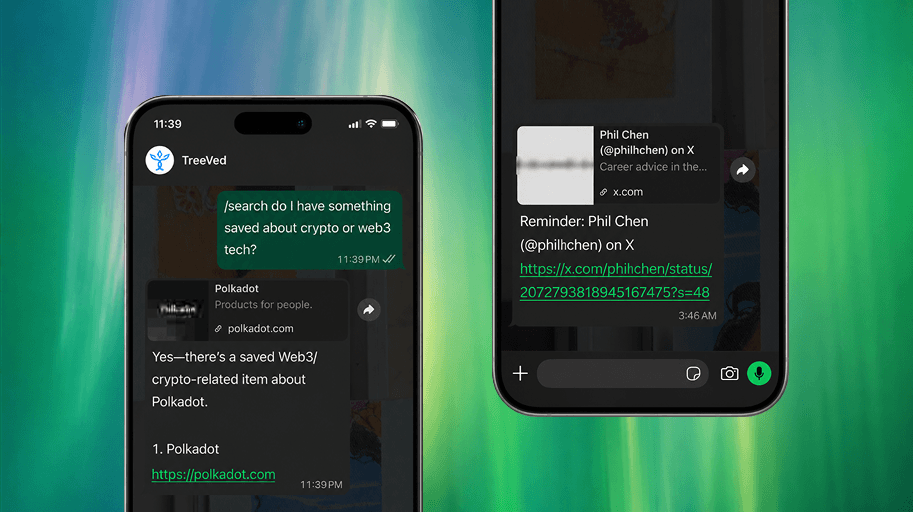
WhatsApp lets you use Treeved from your phone. You can send a link to save it, add a short note beside the link, search your Vault, and receive reminder messages.
Requirements
- You need a Treeved account.
- Your WhatsApp number must be added to your Treeved account.
- WhatsApp actions require an active plan or trial.
- WhatsApp updates must be turned on in Settings.
Connect your number
Open Website Settings, go to Connections, add your WhatsApp number with country code, and save it. Keep WhatsApp updates turned on if you want reminders and other WhatsApp messages.
Save a link
Send any message that includes a link. Treeved saves the first link it finds. It cleans the link, gets the page title when possible, and saves it to your Vault.
If Treeved can place the item right away, WhatsApp replies with the saved title and location. If Treeved is still organizing it, the first reply may be brief, and a later reply can tell you the final Interest and Topic.
Add a note
Add text before or after the link in the same WhatsApp message. Treeved saves that text as your note for the source.
Example: https://example.com This explains the idea I want for the pitch.
Search
Send /search followed by what you want to find. Treeved searches your Vault and replies with an answer plus a few matching saved items.
To choose how many results Treeved should consider, put a number from 1 to 20 after/search. Example: /search 3 support team ideas.
Reminders
Treeved can send reminder messages through WhatsApp when reminders are scheduled. When WhatsApp tells Treeved that a reminder was read, Treeved can mark that reminder as opened in your account activity.
Stop messages
Send STOP to opt out of WhatsApp updates. You can turn WhatsApp updates back on later from Website Settings.
Unsupported messages
WhatsApp currently supports links, /search, and STOP. If you send something else, Treeved replies with a short reminder of those options.
To manage setup, read Settings and Data.
Last updated on July 13, 2026